> ## Documentation Index
> Fetch the complete documentation index at: https://portkey-docs-mintlify-vertex-ai-context-caching-docs-39214.mintlify.site/llms.txt
> Use this file to discover all available pages before exploring further.
# OpenClaw
> Route OpenClaw through Portkey for observability, cost tracking, and reliability
[OpenClaw](https://openclaw.ai) is an open-source AI assistant with persistent memory and multi-platform access. Routing it through Portkey gives you request logs, cost tracking, automatic failovers, and team controls.
```mermaid theme={null}
flowchart LR
A[You] --> B[OpenClaw]
B <--> C[Portkey]
C <--> D[LLM Providers]
C --> E[Dashboard]
```
## Get Connected
**Already have Portkey configured?** Skip to step 3 — use your existing provider slug and API key.
**1. Add your provider to Portkey**
Open [Model Catalog](https://app.portkey.ai/model-catalog), click **Add Provider**, enter your API key, and create a slug (e.g., `anthropic-prod`).
**2. Create a Portkey API key**
Go to [API Keys](https://app.portkey.ai/api-keys), click **Create**, and copy the key.
**3. Configure OpenClaw**
```bash theme={null}
openclaw config edit
```
Add the portkey provider:
```json5 theme={null}
{
agents: {
defaults: { model: { primary: "portkey/@anthropic/claude-sonnet-4-5" } }
},
models: {
mode: "merge",
providers: {
portkey: {
baseUrl: "https://api.portkey.ai/v1",
apiKey: "${PORTKEY_API_KEY}",
api: "openai-completions",
models: [
{ id: "@anthropic/claude-sonnet-4-5", name: "Claude Sonnet 4.5" }
]
}
}
}
}
```
**4. Set your API key**
```bash theme={null}
openclaw config set env.PORTKEY_API_KEY "pk-xxx"
```
***
## See Your Requests
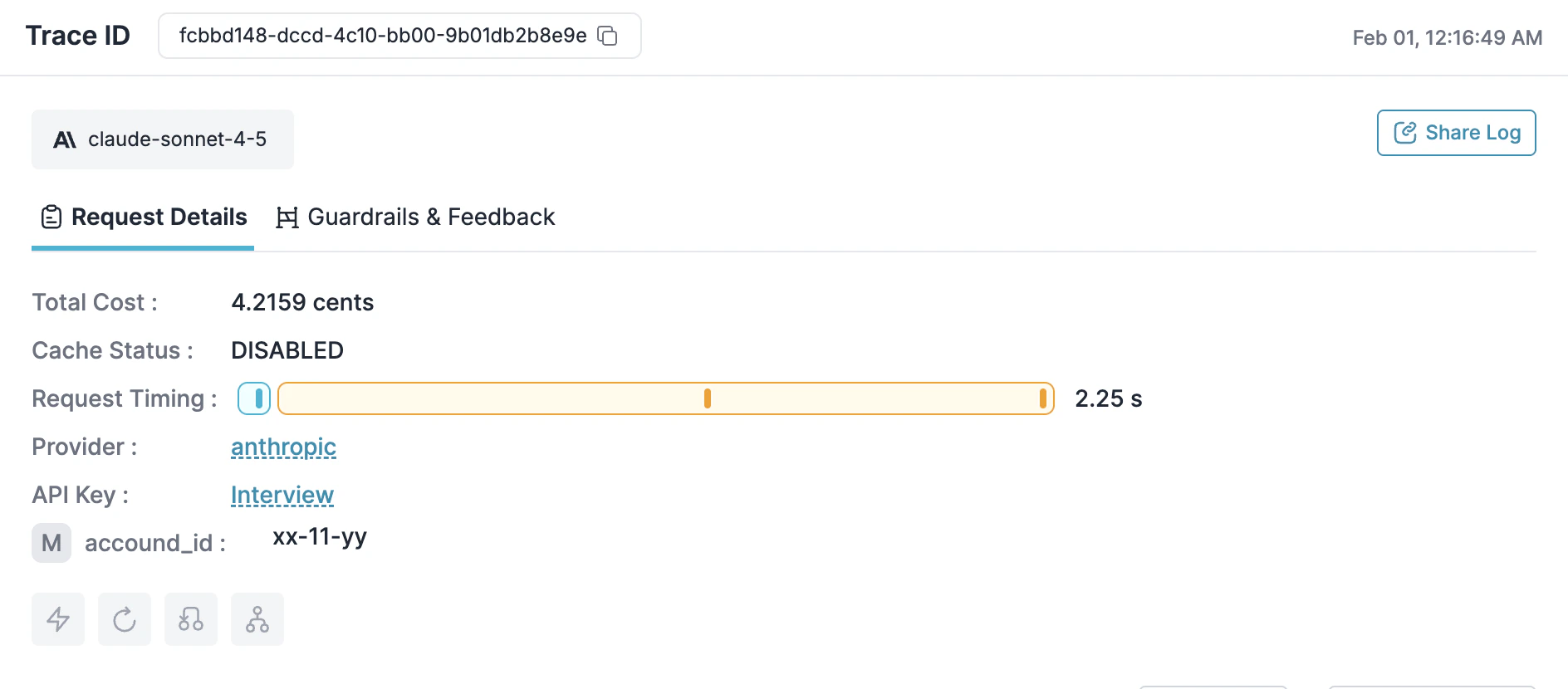
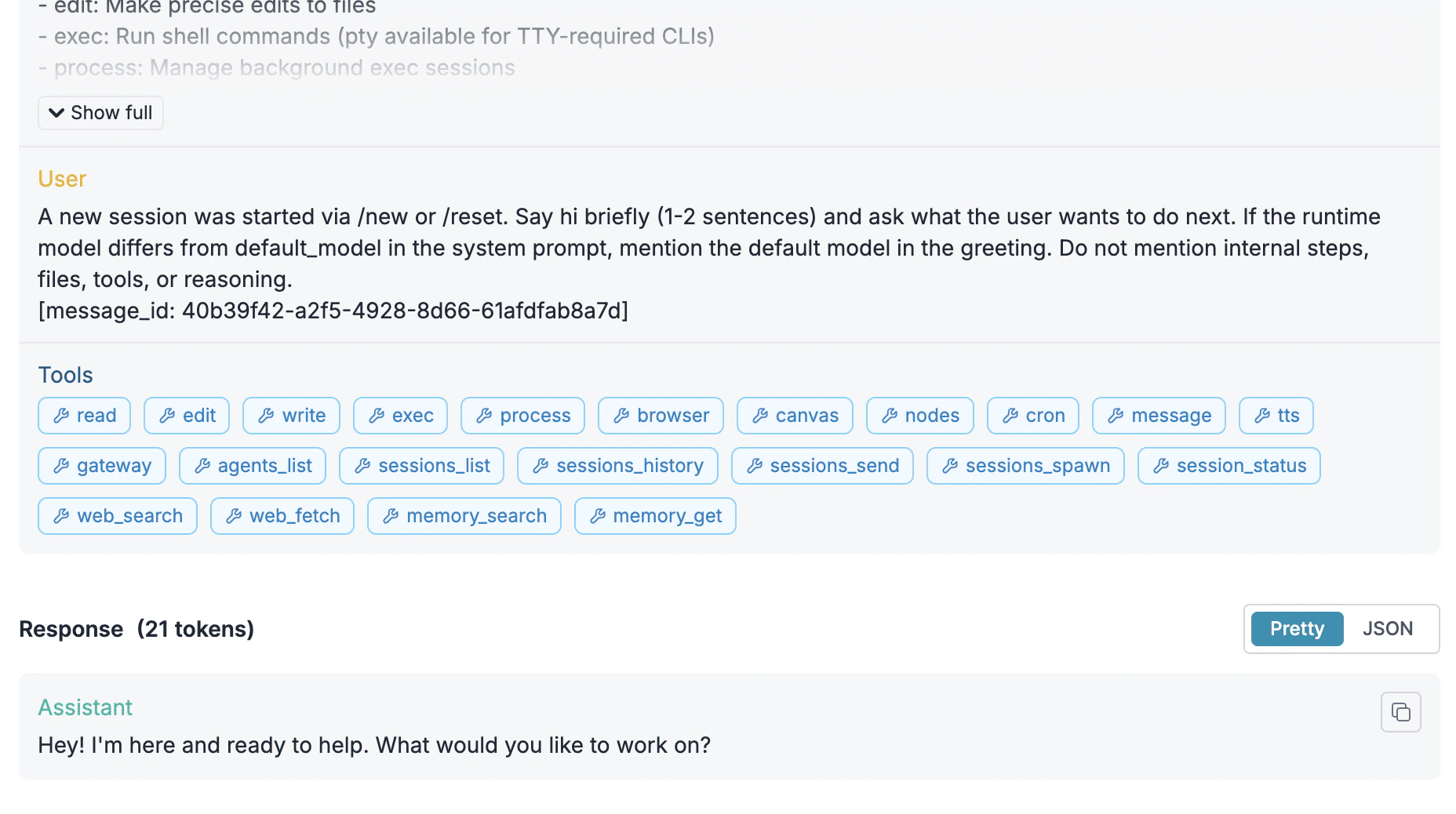
Run `openclaw` and make a request. Open the [Portkey dashboard](https://app.portkey.ai) — you should see your request logged with cost, latency, and the full payload.
 You can also verify your setup by listing available models:
```bash theme={null}
curl -s https://api.portkey.ai/v1/models \
-H "x-portkey-api-key: $PORTKEY_API_KEY" | jq '.data[].id'
```
***
## Add More Models
### Configure Models
Add models from any provider you've configured in Portkey:
```json5 theme={null}
models: [
{ id: "@anthropic/claude-opus-4-5", name: "Claude Opus 4.5" },
{ id: "@anthropic/claude-sonnet-4-5", name: "Claude Sonnet 4.5" },
{ id: "@openai/gpt-5.2", name: "GPT-5.2" }
]
```
Switch your default model by updating:
```json5 theme={null}
agents: {
defaults: { model: { primary: "portkey/@openai/gpt-5.2" } }
}
```
### Track with Metadata
Add headers to group requests by session or tag by team/project:
```json5 theme={null}
// Add to your portkey provider config
headers: {
"x-portkey-trace-id": "session-auth-refactor",
"x-portkey-metadata": "{\"team\":\"backend\",\"project\":\"api-v2\"}"
}
```
These appear in the dashboard for filtering and analytics.
You can also verify your setup by listing available models:
```bash theme={null}
curl -s https://api.portkey.ai/v1/models \
-H "x-portkey-api-key: $PORTKEY_API_KEY" | jq '.data[].id'
```
***
## Add More Models
### Configure Models
Add models from any provider you've configured in Portkey:
```json5 theme={null}
models: [
{ id: "@anthropic/claude-opus-4-5", name: "Claude Opus 4.5" },
{ id: "@anthropic/claude-sonnet-4-5", name: "Claude Sonnet 4.5" },
{ id: "@openai/gpt-5.2", name: "GPT-5.2" }
]
```
Switch your default model by updating:
```json5 theme={null}
agents: {
defaults: { model: { primary: "portkey/@openai/gpt-5.2" } }
}
```
### Track with Metadata
Add headers to group requests by session or tag by team/project:
```json5 theme={null}
// Add to your portkey provider config
headers: {
"x-portkey-trace-id": "session-auth-refactor",
"x-portkey-metadata": "{\"team\":\"backend\",\"project\":\"api-v2\"}"
}
```
These appear in the dashboard for filtering and analytics.
 ***
## Make It Reliable
Create configs in [Portkey Configs](https://app.portkey.ai/configs) and attach them to your API key. When the config is attached, these features apply automatically to all requests.
Automatically switch providers when one is down:
```json theme={null}
{
"strategy": { "mode": "fallback" },
"targets": [
{ "provider": "@anthropic-prod" },
{ "provider": "@openai-backup" }
]
}
```
Handle rate limits and transient errors:
```json theme={null}
{
"retry": {
"attempts": 3,
"on_status_codes": [429, 500, 502, 503]
}
}
```
Distribute requests across regions:
```json theme={null}
{
"strategy": { "mode": "loadbalance" },
"targets": [
{ "provider": "@anthropic-us", "weight": 0.5 },
{ "provider": "@anthropic-eu", "weight": 0.5 }
]
}
```
Cache repeated queries to reduce costs:
```json theme={null}
{
"cache": { "mode": "simple", "max_age": 60 }
}
```
***
## Control Costs
### Budget Limits
Set spending limits in [Model Catalog](https://app.portkey.ai/model-catalog) → select your provider → **Budget & Limits**:
* **Cost limit**: Maximum spend per period (e.g., \$500/month)
* **Token limit**: Maximum tokens (e.g., 10M/week)
* **Rate limit**: Maximum requests (e.g., 100/minute)
Requests that exceed limits return an error rather than proceeding.
### Guardrails
Add input/output checks to filter requests:
```json theme={null}
{
"input_guardrails": ["pii-check"],
"output_guardrails": ["content-moderation"]
}
```
See [Guardrails](/product/guardrails) for available checks.
***
## Roll Out to Teams
### Attach Configs to Keys
When deploying to a team, attach configs to API keys so developers get reliability and cost controls automatically.
1. Create a config with fallbacks, caching, retries, and guardrails
2. Create an API key and attach the config
3. Distribute the key to developers
Developers use a simple config — all routing and reliability logic is handled by the attached config. When you update the config, changes apply immediately.
### Enterprise Options
* **SaaS**: Everything on Portkey cloud
* **Hybrid**: Gateway on your infra, control plane on Portkey
* **Air-gapped**: Everything on your infra
In hybrid mode, the gateway has no runtime dependency on the control plane — routing continues even if the connection drops.
* **JWT**: Bring your own JWKS URL for validation
* **Service keys**: For production applications
* **User keys**: For individual developers with personal budget limits
Create keys via UI, [API](/api-reference), or [Terraform](https://registry.terraform.io/providers/portkey-ai/portkey).
Override default pricing for negotiated rates or custom models in Model Catalog → Edit model.
***
## Troubleshooting
| Problem | Solution |
| ------------------------- | --------------------------------------------------------------------- |
| Requests not in dashboard | Verify base URL is `https://api.portkey.ai/v1` and API key is correct |
| 401 errors | Regenerate Portkey key; check provider credentials in Model Catalog |
| Model not found | Use `@provider/model` format (e.g., `@anthropic/claude-sonnet-4-5`) |
| Rate limited | Adjust limits in Model Catalog → Budget & Limits |
Routing strategies
Logs and analytics
Content filtering
Spending controls
[Status](https://status.portkey.ai) · [Discord](https://portkey.ai/community) · [Docs](/docs)
***
## Make It Reliable
Create configs in [Portkey Configs](https://app.portkey.ai/configs) and attach them to your API key. When the config is attached, these features apply automatically to all requests.
Automatically switch providers when one is down:
```json theme={null}
{
"strategy": { "mode": "fallback" },
"targets": [
{ "provider": "@anthropic-prod" },
{ "provider": "@openai-backup" }
]
}
```
Handle rate limits and transient errors:
```json theme={null}
{
"retry": {
"attempts": 3,
"on_status_codes": [429, 500, 502, 503]
}
}
```
Distribute requests across regions:
```json theme={null}
{
"strategy": { "mode": "loadbalance" },
"targets": [
{ "provider": "@anthropic-us", "weight": 0.5 },
{ "provider": "@anthropic-eu", "weight": 0.5 }
]
}
```
Cache repeated queries to reduce costs:
```json theme={null}
{
"cache": { "mode": "simple", "max_age": 60 }
}
```
***
## Control Costs
### Budget Limits
Set spending limits in [Model Catalog](https://app.portkey.ai/model-catalog) → select your provider → **Budget & Limits**:
* **Cost limit**: Maximum spend per period (e.g., \$500/month)
* **Token limit**: Maximum tokens (e.g., 10M/week)
* **Rate limit**: Maximum requests (e.g., 100/minute)
Requests that exceed limits return an error rather than proceeding.
### Guardrails
Add input/output checks to filter requests:
```json theme={null}
{
"input_guardrails": ["pii-check"],
"output_guardrails": ["content-moderation"]
}
```
See [Guardrails](/product/guardrails) for available checks.
***
## Roll Out to Teams
### Attach Configs to Keys
When deploying to a team, attach configs to API keys so developers get reliability and cost controls automatically.
1. Create a config with fallbacks, caching, retries, and guardrails
2. Create an API key and attach the config
3. Distribute the key to developers
Developers use a simple config — all routing and reliability logic is handled by the attached config. When you update the config, changes apply immediately.
### Enterprise Options
* **SaaS**: Everything on Portkey cloud
* **Hybrid**: Gateway on your infra, control plane on Portkey
* **Air-gapped**: Everything on your infra
In hybrid mode, the gateway has no runtime dependency on the control plane — routing continues even if the connection drops.
* **JWT**: Bring your own JWKS URL for validation
* **Service keys**: For production applications
* **User keys**: For individual developers with personal budget limits
Create keys via UI, [API](/api-reference), or [Terraform](https://registry.terraform.io/providers/portkey-ai/portkey).
Override default pricing for negotiated rates or custom models in Model Catalog → Edit model.
***
## Troubleshooting
| Problem | Solution |
| ------------------------- | --------------------------------------------------------------------- |
| Requests not in dashboard | Verify base URL is `https://api.portkey.ai/v1` and API key is correct |
| 401 errors | Regenerate Portkey key; check provider credentials in Model Catalog |
| Model not found | Use `@provider/model` format (e.g., `@anthropic/claude-sonnet-4-5`) |
| Rate limited | Adjust limits in Model Catalog → Budget & Limits |
Routing strategies
Logs and analytics
Content filtering
Spending controls
[Status](https://status.portkey.ai) · [Discord](https://portkey.ai/community) · [Docs](/docs)